
Virtual Staging Services
Help Buyers Picture the Possibilities
Help buyers picture a furnished home with virtual staging services from Nevada-based TourDSpace. Serving Reno / Tahoe, Las Vegas, Sacramento, Denver, Pittsburgh, Columbus, and Northeast Ohio, including Cleveland.
Turn Empty Space into a Furnished Concept
Real Estate Virtual Staging with a Clear Purpose
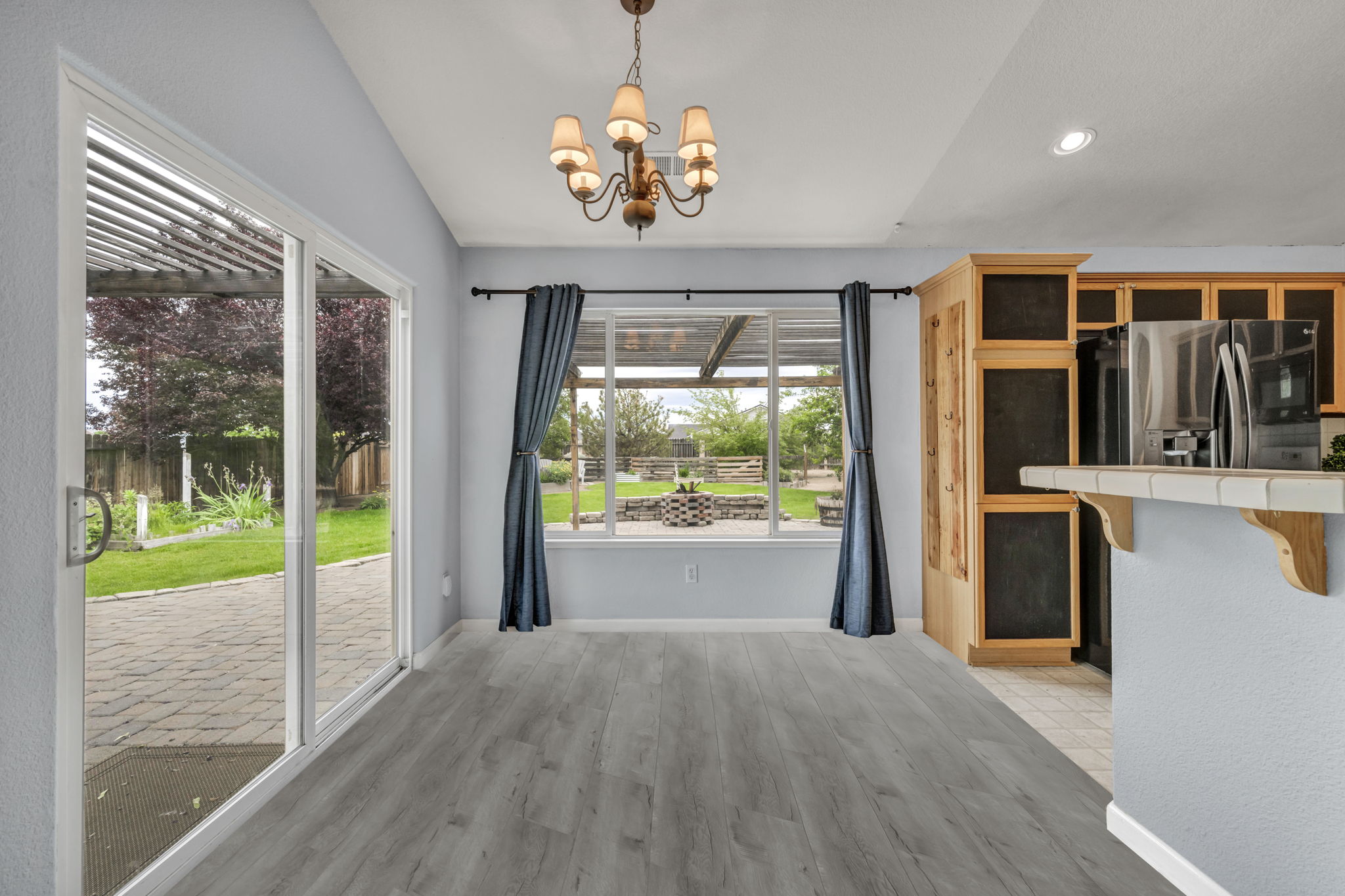
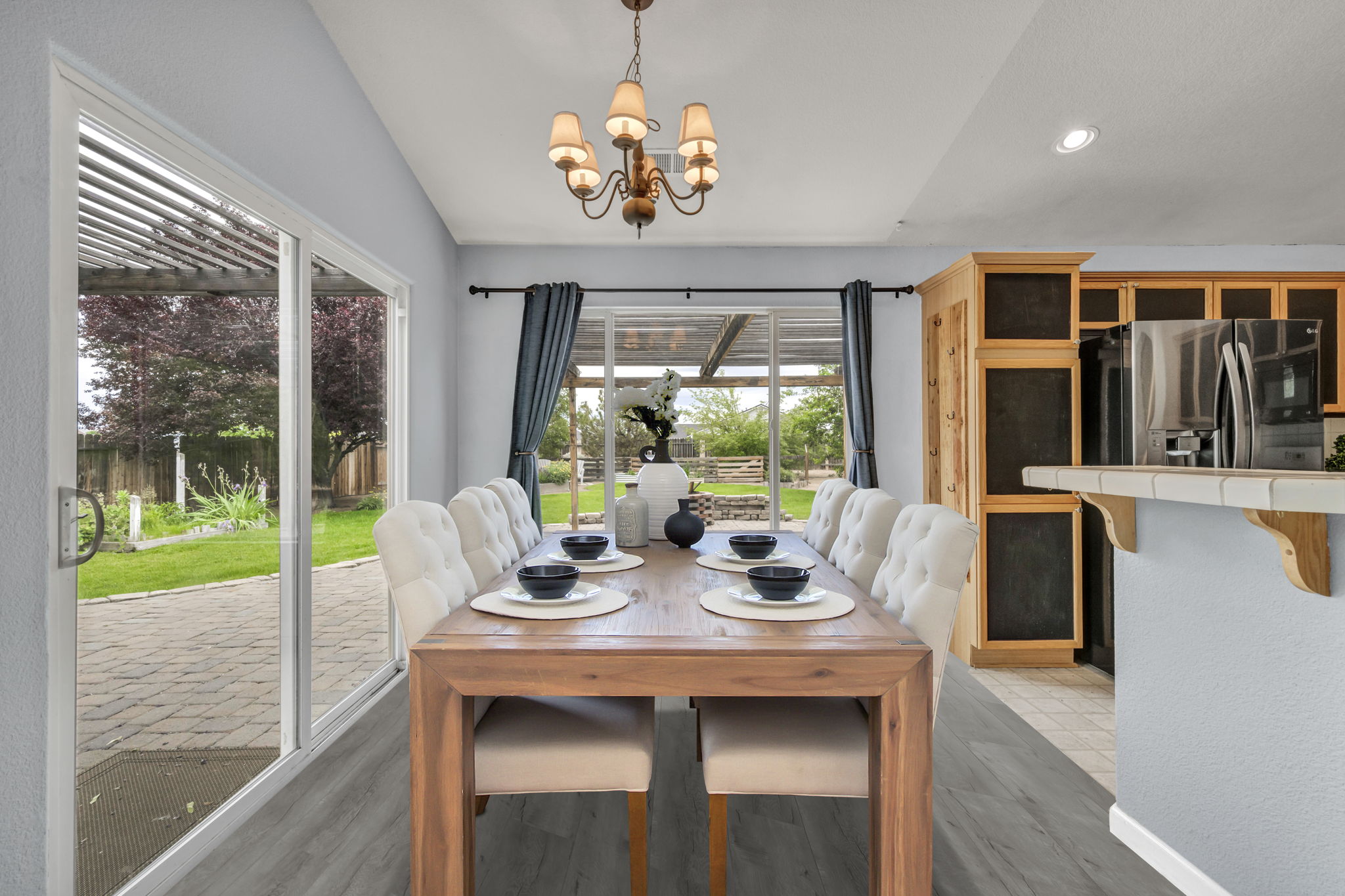
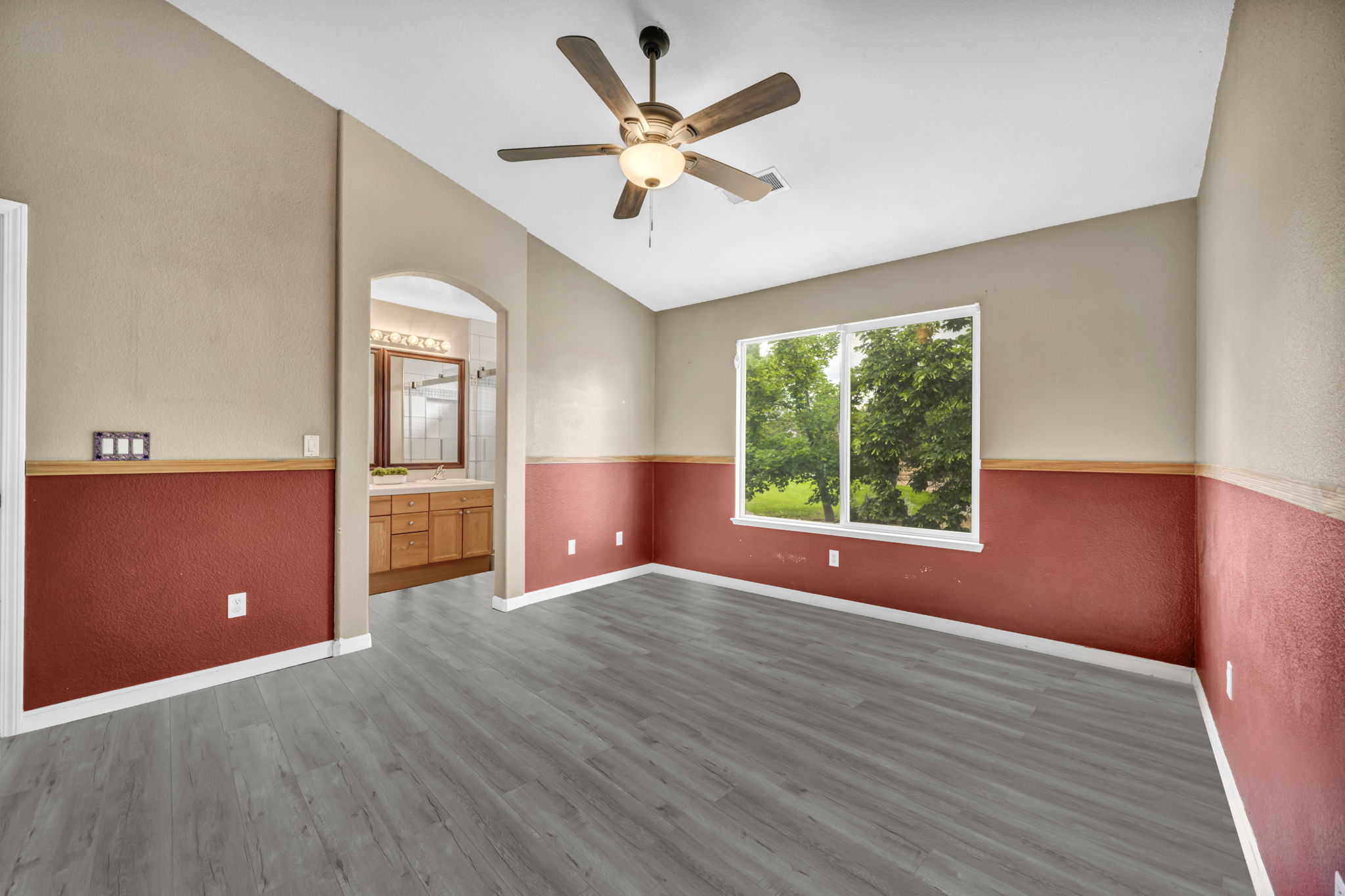
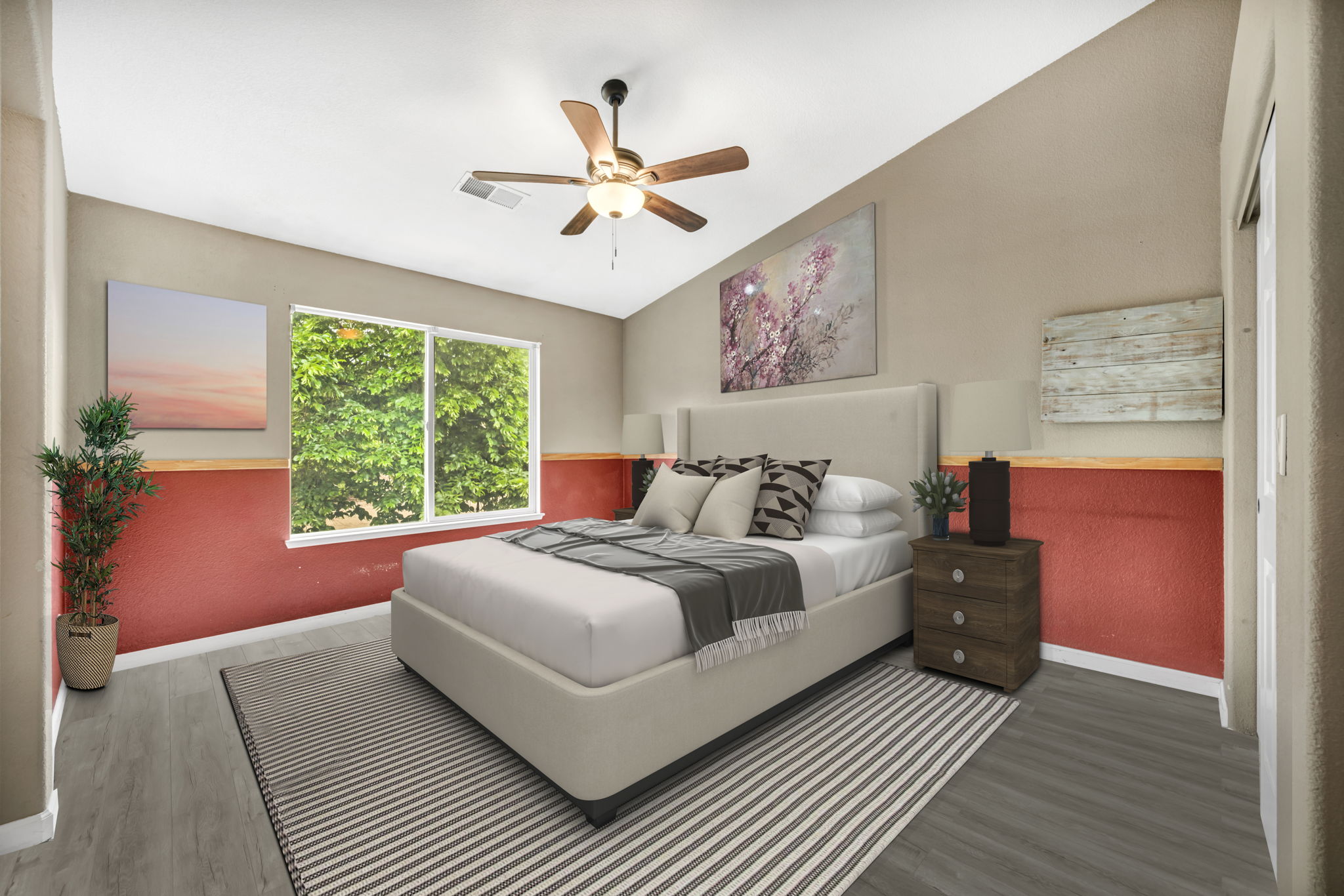
Real estate virtual staging adds digital furniture and decor to selected property photographs. It gives buyers a furnished concept to consider while keeping the original images as a record of the room's actual condition.
For Nevada listings and properties across our other markets, virtual home staging can help explain the use of an empty living area, bedroom, or spare room. Start with the views buyers need to understand, then plan furniture placement around the room's scale and layout.
To virtually stage a home, you do not need to furnish every photograph. Choose the rooms where a considered arrangement would add useful context, and agree on a consistent style for the selected images.
Choose the Spaces That Matter
Virtual Home Staging for Key Living Spaces
For your Nevada property or a listing in another TourDSpace market, focus on rooms whose purpose is difficult to read when empty. Discuss the selected views, intended room functions, and preferred furnishing style before editing begins.
Living Rooms
Virtual furniture staging can suggest a seating layout that connects the main living area with adjoining spaces. Furniture placement should leave clear routes through the room and help viewers understand one possible arrangement.
Bedrooms
Introduce a bed and supporting furnishings at a scale suited to the photograph. A considered bedroom concept can suggest function while keeping windows, doors, and permanent features visible.
Dining Areas
Use listing photo staging to illustrate how a dining area might sit within an open layout. Coordinate the arrangement with adjoining room views so the overall presentation feels consistent.
Home Offices
Show one possible workspace in an empty spare room. Virtual home staging can introduce a desk, chair, and supporting decor without suggesting that the room has been physically altered.
Explore the Possibilities
Virtual Staging Photo Examples
Browse the room views featured in our virtual staging collection. For a Nevada listing or a property in another service market, use these examples to discuss the rooms, angles, and presentation you want for your project.
A Thoughtful Visual Approach
Digital Staging Real Estate Buyers Can Understand
A convincing furnished concept starts with the original photograph. Perspective, light, and furniture scale should work together so the arrangement is easy to read and does not overwhelm the room.
When choosing the best virtual staging approach for your Nevada listing or a property in another market, look for consistency across photographs of the same space. Discuss matching furniture placement, style, and room function before editing begins.
Virtual furniture staging should illustrate a possible use of the room. Keep the original photographs available, identify edited images as virtually staged, and avoid using furnishings to obscure the property's condition or imply changes to permanent features.
A Practical Listing Tool
Virtual Staging Real Estate Agents Can Use
Virtual staging offers a way to present furnishing ideas in the listing photographs. It helps agents explain how selected rooms could be used while making clear that the furniture is digitally added.
For Nevada properties and listings across our other markets, the most useful result is a clear, believable concept. The edited images should complement accurate property information and the original photographs, giving buyers both the current view and a possible furnished arrangement.
- Give empty rooms a recognizable function.
- Illustrate a possible furniture arrangement.
- Create a furnished concept without moving furniture on site.
- Support property pages and listing presentations.
- Complement original room photographs with labeled visualizations.
From Photograph to Furnished Concept
Plan Your Virtual Staging Project
Planning virtual staging for a Nevada listing or a property in another market? A clear photo selection and furnishing brief help align the project with the spaces you want buyers to understand.
-
1
Choose Your Images
Share the property address and clear photographs of the rooms you want staged. Ask whether the existing images are suitable or whether a new photography appointment would help.
-
2
Define the Furnishing Brief
Identify each room's intended use and share style preferences. Confirm the number of images and discuss a consistent arrangement where several views show the same room.
-
3
Confirm Scope and Timing
Agree on the project requirements, price, delivery schedule, and included revisions before work begins. Discuss any requests beyond adding furniture and decor separately.
-
4
Review Your Listing Images
Check the completed images against the agreed brief. Clearly identify digitally staged views when publishing and keep the original photographs available alongside your property marketing.
Your Listing, Your Local Market
Virtual Staging Services for Nevada and Our Other Markets
TourDSpace is based in Nevada and serves Reno / Tahoe, Las Vegas, Sacramento, Denver, Pittsburgh, Columbus, and Northeast Ohio, including Cleveland. Share your property location and selected images to discuss staging requirements and any local photography needs.
Nevada
Explore virtual staging services for Nevada listing photographs. Share the selected rooms and discuss whether you need digital staging only or a coordinated photography appointment.
Discuss Nevada StagingReno / Tahoe
Plan real estate virtual staging for your Reno / Tahoe property. Select the room views where furniture would help explain the space and confirm your project requirements.
Discuss Reno / Tahoe StagingLas Vegas
Arrange virtual home staging for your Las Vegas-area listing. Discuss furniture style and room function, and review our local staging guide for more context.
Read our Las Vegas staging guide Discuss Las Vegas StagingSacramento
Explore virtual furniture staging for your Sacramento listing photos. Share clear images and your preferred presentation so the project scope can be confirmed.
Discuss Sacramento StagingDenver
Plan listing photo staging for your Denver-area property. Discuss the selected rooms, image suitability, and consistency across multiple views of the same space.
Discuss Denver StagingPittsburgh
Use a furnished concept to introduce selected rooms in your Pittsburgh listing. Share the original photographs and confirm the style, image count, and delivery requirements.
Discuss Pittsburgh StagingColumbus
Explore virtual staging options for your Columbus-area property photographs. Identify the rooms that would benefit from furnishing context and confirm the editing brief.
Discuss Columbus StagingNortheast Ohio / Cleveland
Plan virtual staging for Northeast Ohio listings, including Cleveland. Share the selected images and explore our Cleveland staging guide when planning your property presentation.
Read our Cleveland staging guide Discuss Northeast Ohio StagingBuild a Complete Property Presentation
Pair Virtual Staging with Listing Photography
The original photograph sets the foundation for the staged image. A clean room, balanced lighting, and a useful camera angle give digital furniture a more coherent setting. Prepare the property before photographing it, even if the selected views will later be virtually staged.
For a Nevada property or a listing in another TourDSpace market, coordinate the photography and staging brief early. Decide which rooms need a furnished concept and retain unstaged views so your campaign presents both the existing space and the proposed arrangement.
Explore our professional real estate photography or discuss adding virtual staging to your selected listing images.
Before You Request a Project
Virtual Staging Services FAQs
What are virtual staging services?
Virtual staging services add digital furniture and decor to selected property photographs. The finished images illustrate a possible furnished arrangement; they do not change the physical property. Keep the original photographs available so buyers can also see the space as it is.
Which areas does TourDSpace serve for virtual staging?
TourDSpace is based in Nevada and serves Reno / Tahoe, Las Vegas, Sacramento, Denver, Pittsburgh, Columbus, and Northeast Ohio, including Cleveland. Share the property location and selected photographs to confirm your staging project and any photography services needed locally.
How is virtual staging different from physical home staging?
Physical staging places furniture inside the property. Virtual home staging adds furnishings to the photographs, so the digital items will not be present during a showing. Both the edited images and the original views should be presented clearly so buyers understand what they are seeing.
Which rooms should I choose when I virtually stage a home?
Start with rooms where a furnished concept would clarify function or arrangement, such as a living area, primary bedroom, dining space, or spare room. To virtually stage a home effectively, choose useful views and agree on furniture scale, style, and consistent placement across photographs.
Can I use my existing photographs for virtual furniture staging?
Share the images you would like to use with TourDSpace. Suitability depends on image clarity, resolution, lighting, perspective, and how much of the room is visible. Confirm that you have permission to use and edit the photographs before submitting them.
How much does virtual staging cost, and how long does it take?
Cost and delivery timing depend on the selected images, project scope, editing requirements, and requested revisions. Ask TourDSpace to confirm the current rate, included edits, revision options, and expected delivery date before placing an order.
What should I look for in the best virtual staging?
The best virtual staging approach for your listing should consider furniture scale, perspective, lighting, and consistency across room views. Look for a furnishing concept that helps explain the space while keeping the property's permanent features and actual condition clear.
Should staged images be labeled, and can I combine staging with photography?
Clearly identify digitally staged images and keep the original room photographs available. Check your listing platform's publishing requirements before uploading. TourDSpace offers virtual staging as a property photography add-on; discuss the rooms, image count, and package when arranging your media project.
Give Buyers a Clearer Picture
Bring Your Next Listing into Focus
Request virtual staging services for your Nevada listing or a property in another TourDSpace market. Share your selected photographs and discuss the rooms, furnishing style, and project requirements.